
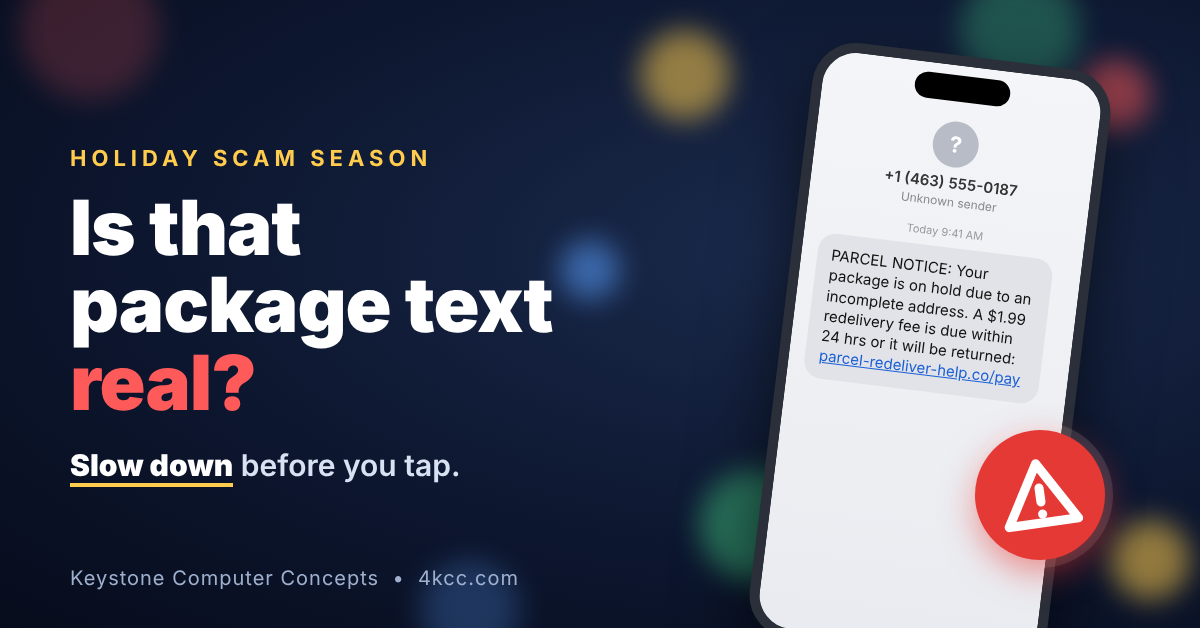
The holidays are when scammers work hardest. We’re all expecting packages, we’re shopping on our phones between errands, and we’re in a hurry, and that’s exactly the mood a scammer wants you in.
This post covers the scams I see most often this time of year, whether they show up on your phone, tablet, or computer. None of it takes technical skill. Mostly it comes down to one habit: slow down before you tap.
1. That “your package is on hold” text is probably fake
Fake delivery messages are the most common text scam out there. According to the FTC, people reported $470 million in losses from text scams in 2024, and fake package problems were the most reported type (source). They usually say a package is on hold, needs an address update, or requires a small fee ($1.99 or $3.49) before it can be delivered.
They work so well on phones because the small screen hides the fake web address, and everybody really is waiting on a package in December.
What to do:
- Don’t tap links in delivery texts or emails you weren’t expecting. Real delivery texts give you information. They don’t ask you to pay or “confirm” anything.
- Check your order by opening the store’s app or typing the carrier’s website in yourself (usps.com, ups.com, fedex.com).
- Don’t reply, not even “STOP”, to a number you don’t recognize. Replying tells the scammer your number works. Block it and delete it.
- Forward scam texts to 7726 (it spells SPAM). Your carrier uses those reports to block scammers.
- Bonus: USPS Informed Delivery is free and shows you what’s actually on the way, so a fake “held package” text is easier to spot.
2. Shop where you know the store
Fake shops pop up every season, built with photos and logos stolen from real brands. They show up in social media ads and in emails with “deals” that are too good to be true. The FBI’s advice is simple: don’t click the link in a promo email. Go straight to the store’s own website and see if the sale is really there.
- Type the address yourself or use the store’s official app, instead of tapping ads.
- Look up a store you’ve never heard of before buying. Search its name plus “scam” or “reviews”, and be wary of a site that’s only a few weeks old.
- Not sure about a store you saw in an ad? Ask AI. Ask an assistant like Claude, ChatGPT, or Gemini: “Is [store name] legit? Are there complaints about it?” Ask it to show its sources so you can check them yourself. If it finds nothing at all, be careful, because brand-new scam sites often have no history yet. And never paste your card or account details into the chat.
- Pay with a credit card. It gives you the strongest protection if you need to dispute a charge. Apple Pay and Google Pay are good too, since the store never sees your real card number.
- Walk away from any seller who wants gift cards, wire transfers, Zelle or Cash App, or crypto. Those are red flags.
- Check your card statements weekly through January. Fraud from the holidays often shows up weeks later.
3. Gift cards are for gifts, not for paying bills
If anyone asks you to pay with a gift card, it’s a scam. Every time. The FTC says no legitimate company or government agency will ever ask for payment by gift card. Once you read the numbers off the back, the money is gone.
Watch for these calls and messages in particular:
- “Amazon” or “Apple” calling about a big order you didn’t make. They’ll offer to cancel it if you install a program or log in to your bank. Amazon won’t ask you to pay outside its website, and it won’t ask for remote access to your computer (source).
- A pop-up saying your computer or phone is infected, with a number to call. Don’t call. Close the browser. If it won’t close, restart the device. Real virus warnings don’t come with a phone number.
- A grandchild or relative “in trouble” who needs money fast. Today’s AI can copy a voice from a short video clip. Hang up and call that person back on the number you already have. Better yet, agree on a family code word over the holidays.
- Charity requests by text or social media. Give through the charity’s own website, and look it up first.
One rule covers almost all of these: never let someone who contacted you get remote access to your device. A real tech company won’t call you out of the blue.
Quick checklist
- Don’t tap links in delivery texts. Check the store’s app or the carrier’s site instead.
- Forward scam texts to 7726, then block and delete them.
- Shop by typing the store’s address yourself. Pay with a credit card or Apple Pay/Google Pay.
- Never pay anyone with a gift card, wire transfer, or crypto.
- Never give remote access to someone who called you.
- Set a family code word for emergency calls.
- Check your card statements every week through January.
If you think you’ve been scammed
Move fast. The sooner you act, the more you can stop.
- Call your bank or card company using the number on the back of your card. Ask them to stop or dispute the charge.
- Change your passwords, starting with your email, from a device you trust.
- Gift card scam? Call the company that issued the card right away. Sometimes they can freeze the funds.
- If someone had remote access to your computer, disconnect it from the internet and have it checked before you use it for banking again.
- Report it at ReportFraud.ftc.gov and the FBI’s IC3.gov.
And don’t be embarrassed. These scams are built by professionals to fool smart people, and I’ve seen them catch folks with decades of computer experience.
Need a hand?
If something on your phone or computer doesn’t look right, or you think a scammer got in, reach out before you do anything else. You’ll find me at 4kcc.com. Happy holidays, and stay safe out there.